
NOW ENROLLING
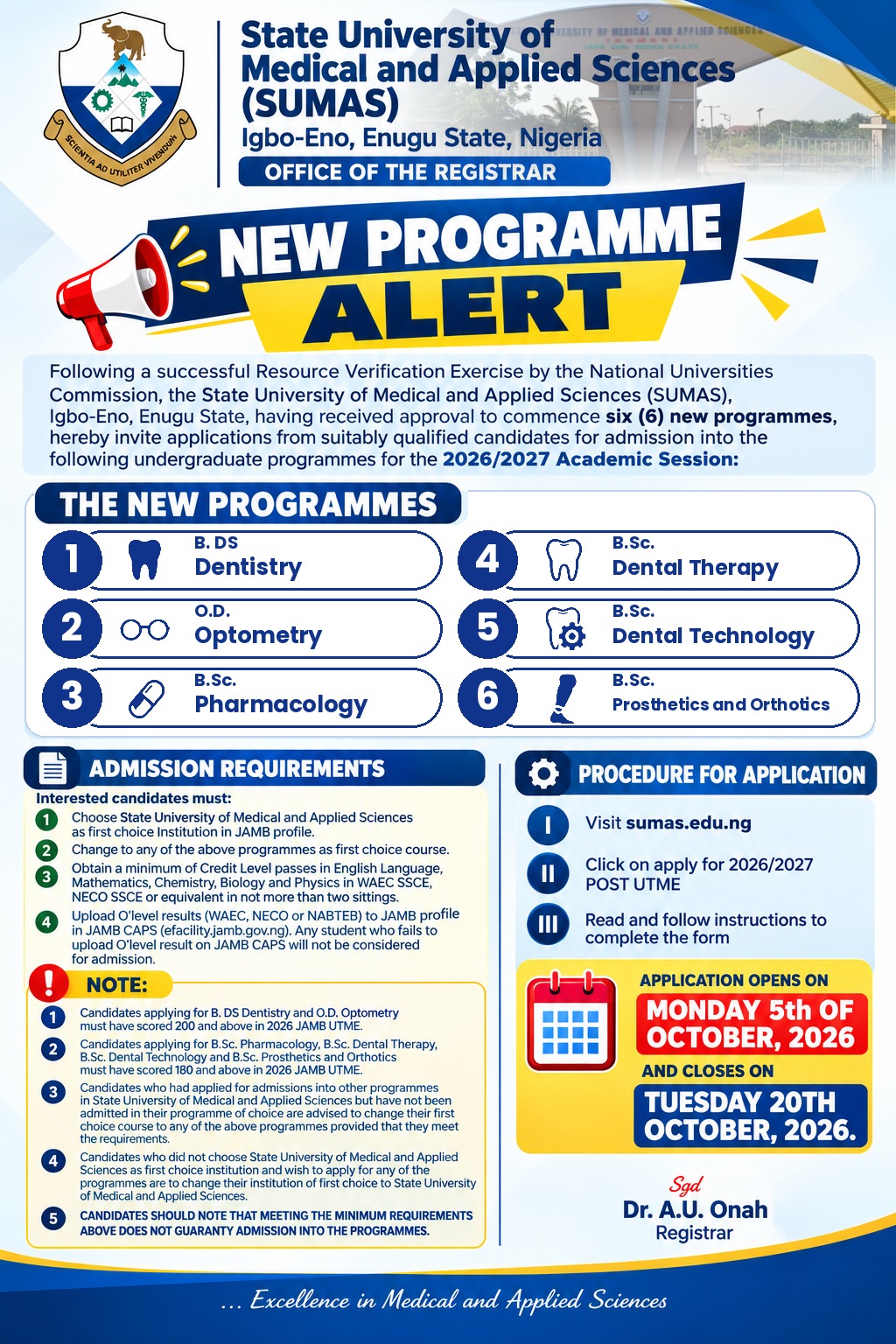
SUMAS Admission
ADMISSION GUIDELINES FOR CANDIDATES OFFERED PROVISIONAL ADMISSION INTO SUMAS, IGBO-ENO FOR THE 2026/2027 ACADEMIC SESSION
Candidates who have been offered provisional admission into the State University of Medical and Applied Sciences (SUMAS), Igbo-Eno, Enugu State, for the 2026/2027 Academic Session are required to carefully follow the steps below to complete their admission, clearance and registration processes.
Candidates who have been offered admission should first confirm and accept their admission on the JAMB Portal.
IMPORTANT NOTICE TO ALL PROVISIONALLY ADMITTED CANDIDATES
Please note that if your name appears on the SUMAS Admission List but you have not yet registered for the SUMAS Post-UTME Screening, you are required to complete your registration.
Start your Post-UTME registration on https://samp.sumas.edu.ng/
Pay the required screening fee to complete the payment process.
Fill in all your personal and academic information accurately and submit your registration.
Visit the SUMAS ICT Unit after completing your registration and payment for verification and approval.
Important: All affected candidates are advised to complete this process promptly to avoid delays in their admission processing.
You are not expected to start the admission profile from the beginning. Information previously supplied during the Post-UTME application should remain intact and should be reviewed for accuracy.
Most of your profile information should already be available from your SAMP/Post-UTME application. Carefully review all tabs and complete any missing information.
After successfully reviewing and updating your profile, proceed to payment of the Acceptance Fee.
Acceptance Fee: ₦50,000.00 (Fifty Thousand Naira only)
The Acceptance Fee is processed through the SUMAS Revenue Portal, using a process similar to the one used for Post-UTME payment.
Candidates experiencing payment-status problems should contact the University Bursary Department for assistance.
After updating your profile and successfully paying the Acceptance Fee, proceed to the Clearance Portal.
Provide the details of a referee who can provide a reference on your behalf.
Ensure that the referee’s email address is correct and active. After final submission, the referee will receive an email containing a link to complete the Referee Form.
IMPORTANT: The Preview stage is your opportunity to correct mistakes. After final submission, certain information may no longer be editable.
The Clearance Portal will generate the relevant registration and clearance documents, including:
The Referee Form will be completed by your nominated referee through the link sent to the referee’s email address. Print and sign the forms that require your signature and keep them together with your credentials for physical clearance.
Proceed to Step 7
Proceed to your Faculty Officer for physical clearance with the originals for sighting and the required photocopies of the relevant documents.
Candidates using two O’Level sittings should provide the appropriate result verification details or cards for both results.
After successful physical and online clearance, your Matriculation Number may be generated by your Faculty Officer, where authorised, or by the ICT Department. Keep the Matriculation Number safely, as it becomes your primary student identification number for subsequent activities on the SUMAS ePortal.
Hostel accommodation is subject to availability and is generally allocated on a first-come, first-served basis. Where a hostel invoice has an expiry period indicated on the portal, payment must be completed within that period.
Candidates should regularly check their portal and official University communications for information relating to other approved payments, which may include Development Fees/Levies, Annual Professional Fee (College Fee), Faculty or Departmental charges, medical-related charges, accommodation charges or other approved University fees.
Students should only make payments using officially approved SUMAS payment channels. Do not make University payments into personal bank accounts or through unauthorised agents.
Proceed to Step 9
Students who experience payment reconciliation or payment-status problems should visit the Bursary Department or ICT Department for assistance.
Where you are uncertain about a course, contact your Faculty or Department before completing the registration.
Returning students are also required to follow the applicable procedures under Step 8 (School/Hostel and other approved fee payments), Step 9 (Bursary/payment verification where required), and Step 10 (Course Registration).
Returning students should regularly check their ePortal accounts and official University communication channels for information regarding school fees, Development Fees/Levies and any other approved charges for the academic session.
Accept JAMB Admission → Check Admission on SAMP → Log in to SUMAS ePortal → Review/Update Profile → Pay ₦50,000 Acceptance Fee → Complete Clearance Portal → Enter Motivation Letter and Referee Details → Preview and Submit → Download Clearance Forms → Complete Physical Clearance → Generate Matriculation Number → Pay School/Hostel and Other Approved Fees → Complete Bursary Clearance → Register Courses.
Welcome to the prestigious State University of Medical and Applied Sciences (SUMAS), Igbo-Eno, Enugu State, Nigeria.
CONGRATULATIONS!
Signed,
A. U. Onah
Registrar
State University of Medical and Applied Sciences (SUMAS)
Igbo-Eno, Enugu State, Nigeria


I have not been able to update my Jamb result and profile picture. The update button is not working, please what is the problem??